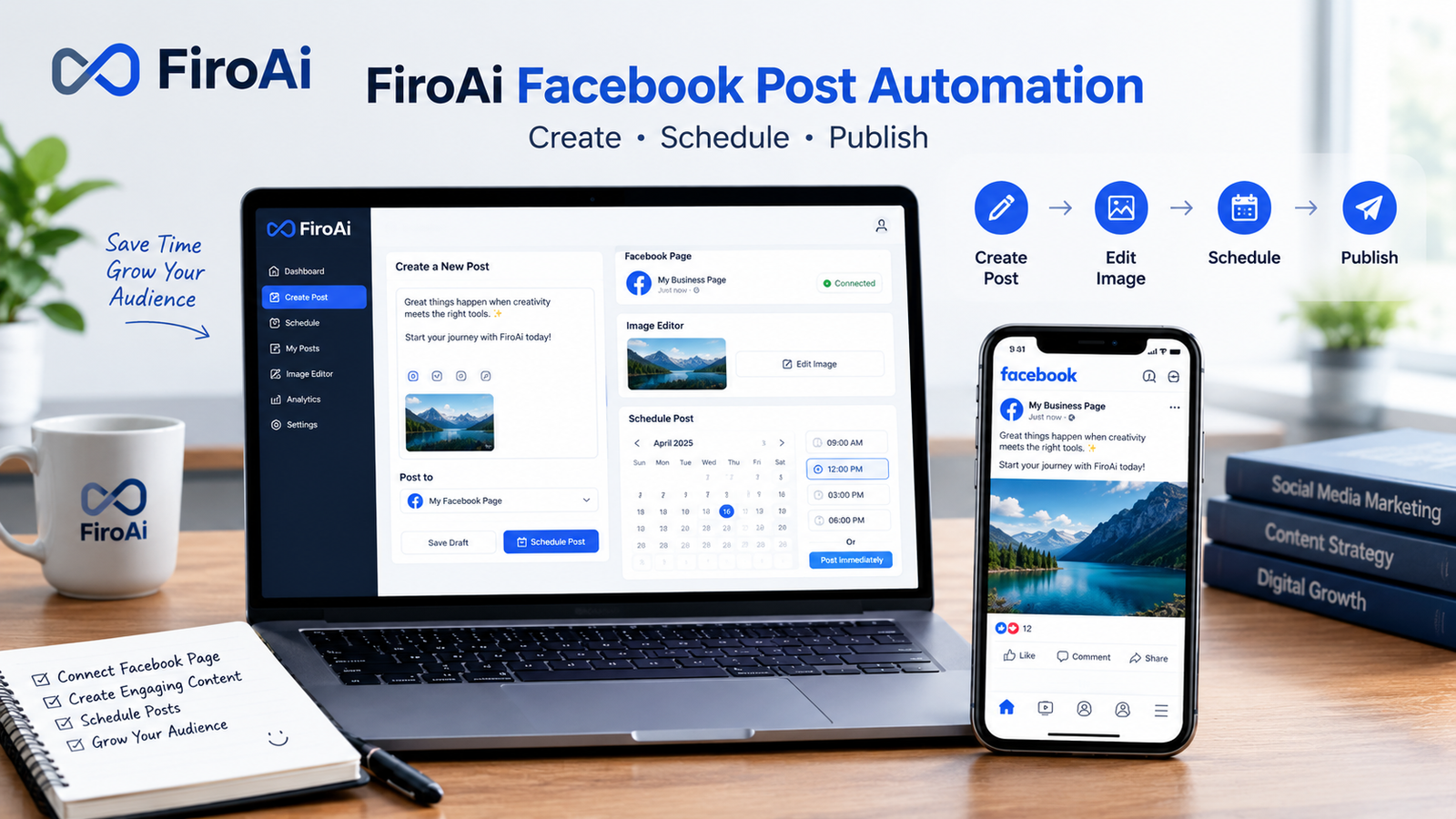
If you want to use FiroAi to automate Facebook posts, the basic workflow is straightforward: connect your Facebook account or page, prepare your post, choose whether to publish it immediately or schedule it, and then let FiroAi handle the publishing workflow. The real benefit is reducing repetitive manual work when you manage a Facebook page regularly.
FiroAi is built around Facebook posting automation, including instant posting, scheduled posting, Facebook page management, and image editing. Instead of opening Facebook every time you need to publish something, you can organize your posting workflow through the platform.
In this guide, I’ll walk you through the process step by step, explain where automation actually saves time, and cover the problems you may encounter along the way.
What Is FiroAi?
FiroAi is a digital marketing tool designed to simplify social posting, particularly for Facebook pages.
Its main appeal is straightforward: instead of manually preparing and publishing every post, you can use the platform to organize your Facebook publishing workflow.
Depending on your use case, you can use FiroAi for tasks such as:
- Creating Facebook posts
- Publishing posts instantly
- Scheduling posts for later
- Preparing image-based posts
- Editing images before publishing
- Managing a more consistent Facebook posting routine
This puts FiroAi in the same general problem space as other Facebook automation and scheduling tools, although the exact features and workflow differ between platforms. Social media management tools commonly focus on scheduling, publishing, bulk content management, and automation.
How to Use FiroAi to Automate Facebook Posts
Let’s break the process into practical steps.
Step 1: Set Up Your FiroAi Account
Start by accessing FiroAi and creating or signing into your account.
Once you’re inside the platform, familiarize yourself with the main posting options before creating your first automated campaign.
You don’t need to automate dozens of posts immediately.
For your first test, create one simple Facebook post and make sure the connection and publishing process work correctly.
That gives you a safe way to understand the workflow before scheduling a large batch.
Step 2: Connect Your Facebook Account or Page
The next step is connecting Facebook to FiroAi.
This is one of the most important parts of the setup because FiroAi needs the appropriate Facebook access to publish content on your behalf.
During this stage, pay attention to:
- Which Facebook account you’re using
- Which Facebook page you want to manage
- Whether the correct page appears after authorization
- Whether the required permissions are granted
- Whether you’re connecting the intended page rather than a personal profile
If the wrong Facebook account is connected, your expected page may not appear.
What if your Facebook page doesn’t appear?
Don’t immediately assume FiroAi is broken.
First check that you’re logged into the correct Facebook account and that you have the necessary access to the page.
You can also try:
- Signing out and back into Facebook
- Refreshing FiroAi
- Reconnecting the Facebook account
- Trying another browser
- Checking your Facebook page access
A simple account mismatch can look like a technical problem when the underlying issue is authorization.
Step 3: Create Your Facebook Post
Once your Facebook connection is ready, prepare the content you want to publish.
A good automated post still needs good content.
For example, a basic promotional post could include:
Headline:
“New SEO Guide Published”
Body:
“We’ve just published a practical guide covering broken link building strategies, outreach tips, and common mistakes. Read the full guide today.”
Call to action:
“Read the full article.”
Keep your first automated post simple.
You want to test the publishing workflow, not troubleshoot five different variables at once.
Step 4: Add an Image When Appropriate
Visual content can make Facebook posts more noticeable, particularly when you’re promoting an article, product, service, or announcement.
FiroAi also provides image-editing functionality as part of its posting workflow.
Before uploading an image, make sure it is:
- Clear and easy to understand
- Properly cropped
- Relevant to the post
- Large enough to display well
- Free from unnecessary text
- Consistent with your brand
Don’t treat automation as a substitute for editing.
The best workflow is usually create → review → automate, rather than blindly publishing everything automatically.
Step 5: Choose Instant or Scheduled Posting
This is where FiroAi becomes particularly useful.
You generally have two different publishing approaches:
Instant Posting
Use instant posting when the content needs to go live immediately.
Examples include:
- Breaking announcements
- New article promotions
- Limited-time offers
- Important updates
- Time-sensitive news
Scheduled Posting
Scheduled publishing is better when you want to prepare content ahead of time.
For example, instead of logging into Facebook every morning, you could prepare several posts in advance and assign them different publishing times.
Facebook itself also provides native scheduling capabilities for Pages, including choosing a future publishing time.
The advantage of using a dedicated workflow is organization: you can prepare your content in advance rather than repeatedly returning to Facebook to publish individual posts.
How to Schedule Facebook Posts With FiroAi
If you’re managing a content calendar, scheduling is where you can save the most repetitive work.
A simple weekly workflow could look like this:
| Day | Content Type | Publishing Approach |
|---|---|---|
| Monday | Blog article | Scheduled |
| Tuesday | Educational tip | Scheduled |
| Wednesday | Image post | Scheduled |
| Thursday | Industry update | Scheduled |
| Friday | Promotional post | Scheduled |
| Saturday | Engagement post | Scheduled |
| Sunday | Weekly recap | Scheduled |
The exact schedule should depend on your audience and analytics.
Don’t assume that publishing seven times per week is automatically better than publishing three times.
Consistency and relevance matter more than simply increasing the number of posts.
A Better FiroAi Automation Workflow
Here’s the workflow I recommend for beginners:
1. Plan
Decide what you want to publish during the week.
2. Create
Write your captions, prepare links, and select images.
3. Review
Check spelling, URLs, images, formatting, and calls to action.
4. Schedule
Assign appropriate dates and times.
5. Monitor
Check that the posts actually published as expected.
This approach gives you the convenience of automation without completely removing human oversight.
How Many Facebook Posts Should You Automate?
There isn’t one perfect number.
A small business might schedule several posts per week, while a publisher or agency could need a much larger content calendar.
The important thing is to avoid creating a large volume of repetitive content simply because automation makes it easy.
A useful mix might include:
- Educational content
- Blog promotions
- Product or service updates
- Industry news
- Visual posts
- Questions
- Customer-focused content
- Occasional promotional offers
That gives your Facebook page more variety.
FiroAi Posts Not Publishing? Try These Fixes
One of the biggest frustrations with automation tools is assuming that a scheduled post will always publish without supervision.
If a FiroAi post doesn’t appear on Facebook, check the basics first.
Check the Facebook Connection
Make sure your Facebook account is still connected and that you’re working with the intended page.
Check the Schedule
Confirm that the date and time are correct.
Time-zone differences can make a scheduled post appear to have failed when it was actually scheduled for another time.
Test an Instant Post
If scheduling doesn’t work, try a simple instant post.
This can help you determine whether the problem affects the entire Facebook connection or only scheduled publishing.
Check the Facebook Page
Open Facebook directly and verify that you have the required page access.
Reconnect If Necessary
If the connection appears invalid, reconnecting the account may resolve an authorization issue.
If the problem continues after these checks, it’s better to investigate the specific error instead of repeatedly creating new scheduled posts.
Common FiroAi Automation Mistakes to Avoid
Automation saves time, but there are a few easy mistakes to make.
Scheduling Without Reviewing
Don’t schedule a large batch without checking every post.
A single incorrect URL or typo can be repeated across multiple posts.
Posting the Same Content Repeatedly
Automation should make your strategy more efficient—not make your page repetitive.
Create variations in:
- Headlines
- Images
- Captions
- Calls to action
- Content formats
Ignoring Facebook’s Own Rules
Using a third-party tool doesn’t remove Facebook’s platform requirements.
Your content still needs to comply with Facebook’s policies and the permissions associated with your page.
Automating Everything
Some posts benefit from human attention.
Customer questions, sensitive announcements, major promotions, and important brand communications are usually better reviewed manually.
Is FiroAi Good for Facebook Automation?
For someone specifically looking for a FiroAi Facebook automation workflow, the platform’s biggest appeal is convenience.
Instead of treating every Facebook post as a separate manual task, you can build a repeatable process around:
Create → Edit → Schedule → Publish → Monitor
That’s especially useful for users who regularly promote blog posts, products, services, or other recurring content.
However, you should judge the platform based on your actual requirements. If you need extensive multi-platform publishing, advanced analytics, team approvals, or large-scale social management, compare those requirements against the features of broader social media management platforms. Tools such as SocialPilot, for example, emphasize multi-account management, bulk scheduling, analytics, content calendars, and team workflows.
Final Thoughts
Learning how to use FiroAi to automate Facebook posts isn’t really about pressing an “automate” button and walking away.
The better approach is to build a reliable publishing system.
Start with one Facebook page and a few posts. Test the connection, publish one post manually through the workflow, then move into scheduling. Once everything works properly, expand your content calendar.
The biggest time-saving opportunity comes from preparing content in batches rather than creating and publishing every Facebook post individually.
